About edu
If you're here, you want to understand what EDU (Enable Data Union) is, how it works, and how to use the data it produces for analysis, reporting, or dashboarding. This introduction is designed to give you a clear, accessible foundation before you dive into role-specific documentation and training for Developers or Users.
Quick Links
Know what you're looking for?
What is Enable Data Union?#
enable data union is an open framework that when deployed, extracts data out of Ed-Fi, loads the data into a data warehouse, and transforms the data into a data model designed for analytics. The code has been developed by Education Analytics, a non-profit based in Madison, WI. Intended users of edu include Analysts, BI developers, education researchers, and other technical staff at state and local education agencies, who can use the data warehouse to build reports and analyze education data.
The intent of the code is to be:
- Fully functional right out of the box so that it can be used by any education agency that has implemented Ed-Fi, with defaults that make sense for many cases
- Configurable so that common code can be leveraged across many agencies while accounting for local differences, and those configurations can be stored in sensible, contained locations to avoid needing to fork the code
- Extensible so that it can serve as a framework for broader uses of education agencies data warehousing needs by integrating additional data or adding more metrics
- Transparent so you can see how data is being tranformed at every step and everything is controlled by inspectable code
- Secure so that while the logic and code are transparent, the data itself is secure
It is implemented as a codebase that is free and open for education agencies to use with a modular approach to configure, customize, and extend the base functionality. The code is available under the Polyform Non-commercial license.
The concepts and abstractions in the codebase allow for it to be implemented in many different technology stacks, but for now implementing the published code requires an AWS environment and either a Snowflake or Databricks database. We intend to add support for more cloud providers and databases over time.
Why would you use Enable Data Union?#
-
You have data in an Ed-Fi ODS and want to use it for analytics
-
You want to modernize your agency's analytics infrastructure and move away from custom, on-premise data warehouses and take advantage of technological innovations in data engineering
-
You want to build a data warehouse based on Ed-fi but do not want to have to start from scratch when you could share development and maintenance costs with other agencies across the country
-
You do not want to be tied to a vendor company's proprietary product for analytics
What does Enable Data Union actually do?#
Now that we understand the goal of EDU, let's take a closer look at how it works behind the scenes.
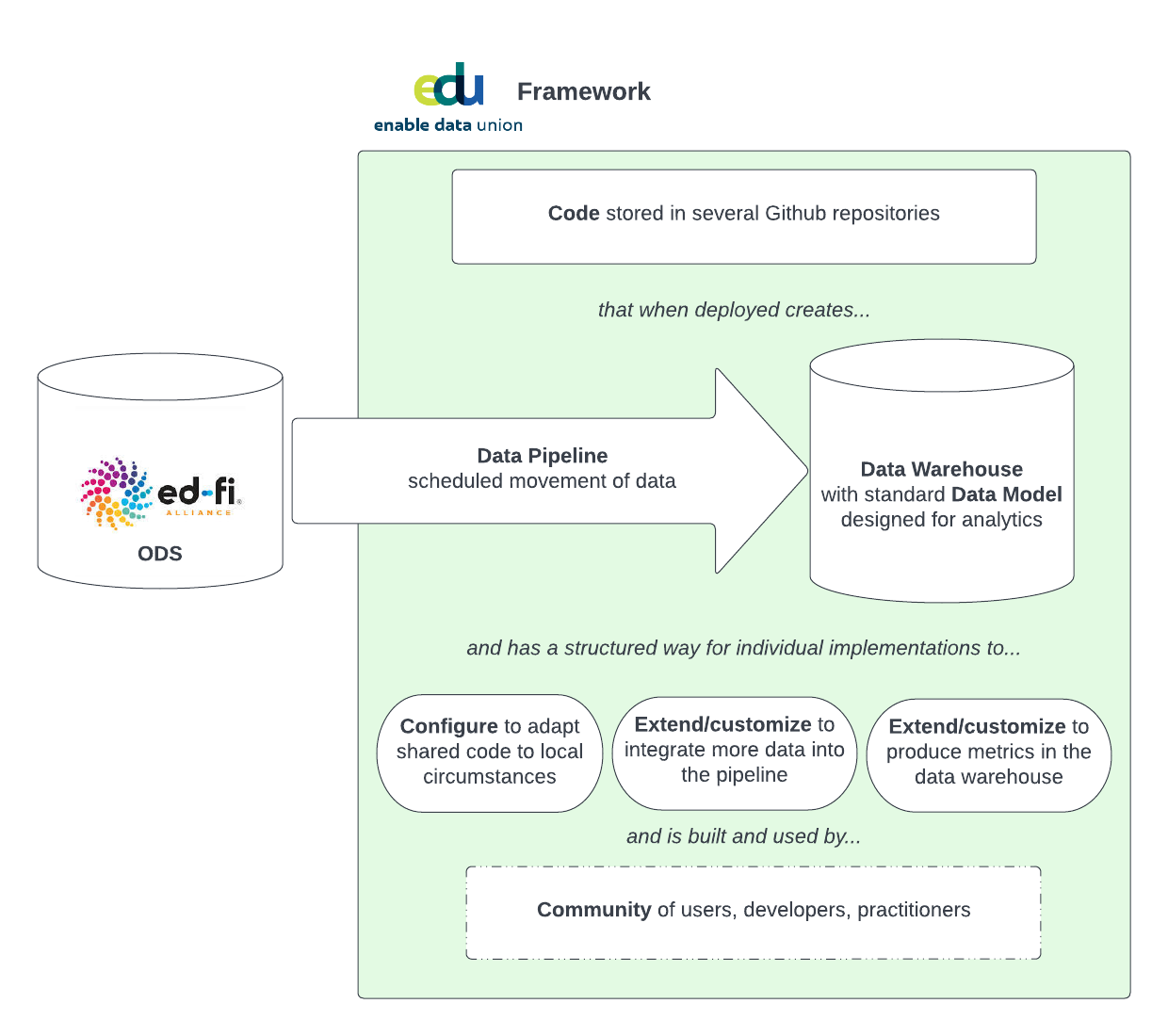
EDU connects to an Ed-Fi ODS, pulls the data in, organizes it, and stores it in a data warehouse so end users can query it. You can think of EDU as the engine that moves data from the operational world (SIS + ODS) into the analytical world (Snowflake or Databricks data warehouse).
One of EDU’s core ideas is modularity. Instead of one giant tool, EDU is made of smaller, purpose-built packages. Some packages handle extraction, some handle loading, and others handle data modeling. At a high level, they fall into two broad groups:
- Packages that move data from the Ed-Fi ODS into cloud storage or a warehouse.
- Packages that transform data into clean staging tables and final dimensional models.
To make sense of these pieces, it helps to see how they fit together. We describe EDU as a framework, meaning it’s made up of several components that each play a specific role. The diagram below shows the main parts of the framework and how they relate to one another:
What systems are required for Enable Data Union to work?#
To understand EDU, it helps to look at the systems that feed data into it. These are the prerequisite components that should be in place before EDU is deployed.
Ed-Fi#
A foundational piece of the EDU landscape is Ed-Fi. Ed-Fi is a national standard for how education data should be organized and shared. It tells schools, districts, and other agencies how to structure their data so everything fits together. In essence, Ed-Fi is analogous to a highly skilled librarian for education-related information, and it provides:
- A data standard that acts as a common language for moving education data from one system to another.
- Supporting tools & technology that provide real solutions to implementing the data standard for secure storage and transmission of education data.
Student Information System (SIS)#
A Student Information System (SIS), is the core system schools use to track everything about students, staff, schedules, attendance, grades, operations, and more. It is the main database schools rely on every day for record keeping.
EDU expects that a SIS is already running and active in an education agency before it comes into the picture. Since virtually all education agencies use SIS platforms, this prerequisite is rarely a problem. The key requirement is that the SIS's vendor must also support sending data in the Ed-Fi Standard format. If that integration isn’t available, it must be developed by the SIS vendor before EDU can be deployed.
EDU doesn’t replace a SIS, modify it, or interact with it directly, rather the SIS sends Ed-FI shaped data to an Operational Data Store (ODS) where it is retrieved by EDU.
Operational Data Store (ODS)#
An Operational Data Store (ODS), is a system that pulls together real time information from different places so it can be viewed in one organized, consistent space. Schools track information like attendance, grades, discipline, enrollment, schedules, assessments, and more in a SIS. The ODS collects that information from the SIS and stores it in one place, in a standard format. In our case, that format is Ed-Fi.
The ODS will also house data from non-SIS sources, like HR/Compliance systems, or student assessment results from various assessment vendors. This is the standard integration layer that EDU's analytical infrastructure relies on. Once a district’s SIS is sending data into an Ed-Fi-compliant ODS, EDU can easily be implemented to automatically retrieve and organize the data for analytical use.
What's next?#
At this point, we hope you have a good sense of what Enable Data Union is, what it produces, and how it fits into the broader Ed-Fi ecosystem. Where you go from here depends on the role you play and what you're hoping to do with EDU.
If you're interested in a managed offering of EDU, including out-of-the-box infrastructure setup, security management, training, and support, check out Stadium.
Build, Configure, or Extend EDU#
Head to the Getting Started for Developers section. This path is for anyone setting up the cloud environment, managing Airflow, Snowflake, Databricks, etc., customizing packages, or extending the data model. You'll learn how the pieces fit together in practice and what's involved in running EDU day-to-day.
Getting Started For Developers
Query or Use EDU Data#
Take a look at the Getting Started for Users section. This path is for analysts, BI developers, researchers, and others who will be writing queries, building dashboards, or working directly with the dimensional warehouse. You'll learn how the tables are organized, what they represent, and how to get the data you need.