Joins
Joins#
In the EDU warehouse, most useful analysis requires data from more than one table. Fact tables store events (like daily attendance), while dimension tables store descriptive information (like student names and demographics). Joins are how you connect these tables together.
A join combines rows from two tables based on a related column, usually a surrogate key (a column that starts with k_). In EDU, you'll typically start from a fact table and join dimension tables to add context.
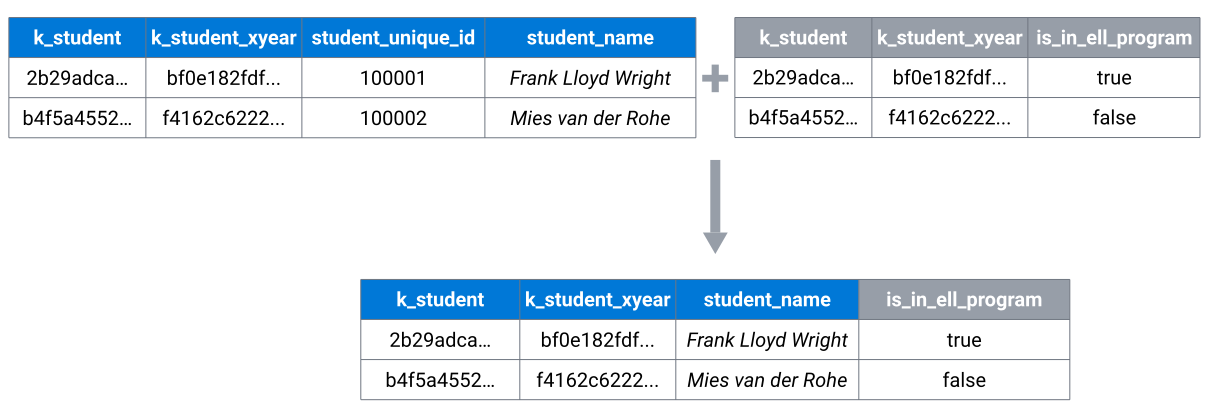
There are several types of joins, but the most common in EDU are inner join and left join. Understanding when to use each is important for getting accurate results.
Before you Write the Join: Understand the Grain#
Before writing any join, stop and answer two questions:
-
What is the grain of each table I'm joining? The grain is what one row represents. In
fct_student_daily_attendance, one row is one student on one day at one school. Indim_student, one row is one student. Understanding this tells you how many rows to expect on each side of the join. -
What do I expect the grain of my result to be? After the join, should the result still be one row per student per day? Or one row per student? If you can't answer this clearly, you're not ready to write the join yet.
Why this matters#
When you join two tables, the number of rows in your result depends on the relationship between the join keys. If you join a fact table (many rows per student) to a dimension table (one row per student), each fact row picks up its matching dimension row — the grain stays the same. But if you join two tables that both have multiple rows per key, every combination is returned. This is called fan-out, and it is the most common source of silently wrong results.
For example, if a student has 180 attendance rows and 2 enrollment rows for the same school, joining those tables on k_student and k_school alone produces 360 rows — doubling every attendance record. Your row counts, sums, and averages will all be wrong, and nothing in the query will error to warn you.
A practical check#
Before you run the full join, verify the grain of the table you're joining to. A quick way to do this is to check whether the join key is unique in that table:
-- Are there duplicate k_student values in dim_student?
select
    k_student,
    count(*) as row_count
from analytics.prod_wh.dim_student
group by k_student
having count(*) > 1;
If this returns zero rows, k_student is unique in dim_student and you can safely join on it without fan-out. If it returns results, you need to understand why (e.g., multiple records per school year) and add additional join conditions or filters to get back to a one-to-one or many-to-one relationship.
Rule of thumb
Joining a fact table to a dimension should never increase your row count. If it does, re-examine the grain of both tables and tighten your join keys or add filters.
Inner Joins#
An inner join returns only rows where there is a match in both tables. If a row in the left table has no match in the right table, it will be excluded from the results.
Inner joins are the default choice in EDU because they ensure data quality: you only get results when both the fact and dimension data exist. This prevents incomplete or orphaned records from appearing in your analysis.
Example: using an inner join
select
    dim_student.safe_display_name,
    fct_student_daily_attendance.is_present
from analytics.prod_wh.fct_student_daily_attendance
join analytics.prod_wh.dim_student
    on fct_student_daily_attendance.k_student = dim_student.k_student
where dim_student.gender = 'Female'
limit 10;
This query only returns attendance records for students that exist in dim_student and match the filter. If a student exists in the attendance fact table but not in dim_student, their records won't appear—which is usually what you want, as it indicates a data quality issue.
When to use left joins
Use left joins when you want to preserve all fact records, even if some dimension data is missing. This can be useful for:
- Data quality checks (finding orphaned records)
- Understanding data completeness
- Preserving all events even when descriptive information is incomplete
However, for most analytics queries, inner joins are preferred because they ensure you're working with complete, valid data.
Left Joins#
A left join returns all rows from the left (base) table and adds matching data from the right table. When no match exists, it fills in null values for columns from the right table.
This is especially useful in analytics when you want to keep all fact records even if some descriptive information is missing. For example, you might want to see all attendance records, even if a student's demographic information isn't available.
Example: joining student names to attendance data
select
    dim_student.safe_display_name,
    dim_student.grade_level,
    fct_student_daily_attendance.is_present,
    fct_student_daily_attendance.is_absent
from analytics.prod_wh.fct_student_daily_attendance
left join analytics.prod_wh.dim_student
    on fct_student_daily_attendance.k_student = dim_student.k_student
where dim_student.gender = 'Female'
    and dim_student.school_year = 2026
limit 10;
Here:
- fct_student_daily_attendance is the left (base) table
- dim_student adds student names and demographics
- All attendance records are preserved, even if a student dimension record is missing
Joining on multiple keys#
Sometimes more than one key column is required to appropriately join two tables. This is common when you need to join two fcts. For example, joining to fct_student_school_association to fct_student_daily_attendance may require both k_student and k_school, to ensure enrollments from school A are not joined to attendance at school B:
...
from analytics.prod_wh.fct_student_daily_attendance
join analytics.prod_wh.fct_student_school_association
    on fct_student_daily_attendance.k_student = fct_student_school_association.k_program
    and fct_student_daily_attendance.k_school = fct_student_school_association.k_school
Using all required keys ensures you join to the correct dimension row and avoid accidental duplication.
Check for duplicates
Be cautious of creating duplicates, especially when joining two fact tables. In the snippet above, both tables allow for multiple records per student & school, which results in a 'many-to-many' join. This could result in undesired duplicate records, if a student has multiple enrollments at the same school and multiple attendance records at the same school (common).
Choosing the correct join#
As a general guideline in EDU:
- Be cautious of duplicates and check the uniqueness of tables you're joining BEFORE writing the join.
- Use inner joins in most cases, to enforce explicit exclusions of unjoined data.
- Use left joins when you want to preserve all rows from your base (fact) table, even if dimension data is missing
- Always join using
k_*surrogate keys if available, rather than descriptive fields - Start from a fact table and add context with dimensions
Wrapping up#
Joins are what turn raw facts into meaningful, human-readable analysis. By starting from a fact table and carefully joining in dimensions, you can add context without losing or distorting the underlying data.
In the next section, we'll see how all these pieces come together in a complete example: calculating attendance rates for female students by joining attendance facts to student dimensions.
Your Turn: Put it all together
Write a query that:
- starts from
analytics.prod_wh.fct_student_daily_attendance - left joins
dim_studentto add student names and demographics - filters to
gender = 'Female'andschool_year = 2026 - selects
safe_display_name,grade_level,is_present, andis_absent - limits to 10 rows
This prepares you for the complete analytics example in the next section.
Your Turn: Extra Credit
Write a query that utilizes at least one join and answers the question "How many students who are actively enrolled in a special education program were absent yesterday?"
« Filtering, Grouping & Ordering
Analytics Examples »